Kogama Tunnel Parkour Game

Kogama Tunnel Parkour Game

Shadow Core Labs
2026-02-18
2026-06-12
Skill

Reviews

Kogama: Tunnel Parkour offers a solid platforming challenge with simple controls and increasingly tricky levels. The acid and ice mechanics add variety without overcomplicating the gameplay. Collecting points to skip stages helps reduce frustration. The game has good replay value as you try to improve your time on each level. It is a reliable choice for fans of the genre who want a free, no-fuss experience.

About This Game

Game Introduction

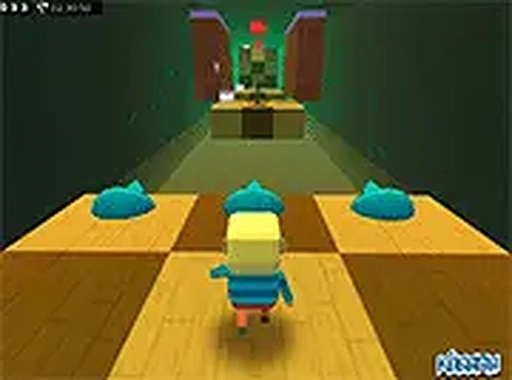
Kogama: Tunnel Parkour is a 3D platform game where players guide a character through a series of tunnels. The environment includes dangerous acid blocks and slippery ice platforms. Each stage requires precise jumps and quick reactions to avoid falling or taking damage. Players collect Kogama points during levels, which can be used to skip particularly difficult sections. The game is free to play in a web browser on desktop computers, with a full-screen mode available for a more immersive experience. The goal is to complete all stages and achieve the fastest time, competing with friends to see who can master the course.

How to Play

To play Kogama: Tunnel Parkour, use a keyboard and mouse on a desktop computer. Move your character with the arrow keys or WASD. Press the jump key to leap over gaps and onto platforms. Avoid the acid blocks, as they cause damage. On icy surfaces, time your jumps carefully to prevent slipping. Collect the glowing Kogama points scattered throughout each stage. These points allow you to skip a stage if you get stuck. The objective is to reach the finish line of every level without falling. You can enable full-screen mode by clicking the full-screen button on the game screen for a larger view.

Game Features

Kogama: Tunnel Parkour is free to play and requires no download. It offers a full-screen mode for focused gameplay. The game includes a competitive multiplayer element, allowing you to compare your progress with friends. Each stage presents unique obstacles, encouraging repeated play to improve your time and technique.

Tips for Success

This game provides a clear challenge that rewards practice and careful timing. The level design is straightforward, making it easy to learn but difficult to master. It is a good choice for short gaming sessions or for those who enjoy precision platform games.

Compatibility & Testing

• Desktop (Windows 11, macOS Ventura)
• Mobile (iPhone 14, Samsung Galaxy S23)
• Tablet (iPad Pro, Android tablet)
✅ Supported browsers: Chrome, Safari, Edge, Firefox (latest versions)
❌ Not supported: Internet Explorer, older browser versions

Faq

Is Kogama: Tunnel Parkour available on mobile devices?
The game is designed for desktop computers and is played in a web browser. It may not be optimized for mobile devices, but you can check the official website for any updates regarding mobile compatibility.
Do I need to create an account to play?
Typically, free online games like this one may allow you to play without an account, but creating an account could enable features like saving progress or competing on leaderboards. Check the game's website for specific requirements.
Can I play Kogama: Tunnel Parkour offline?
Since the game is played in a web browser and likely requires an internet connection to load levels and save progress, offline play is probably not supported. You would need to be online to access the game.
Are there any in-game purchases?
The game is described as free to play, but some free online games may offer optional purchases for cosmetic items or convenience features. No specific purchases are mentioned in the available information.
How many levels are in the game?
The exact number of levels is not specified in the provided information. Typically, parkour games like this may include a series of stages, and players can expect to encounter a variety of tunnel-based challenges.
Is there a way to reset my progress?
If the game saves progress locally or through an account, there may be an option to reset it in the settings menu. Without specific details, you can try clearing your browser cache or checking the game's options for a reset feature.

Similar Games

Choppy Orc Platformer Game

Skill

Colorful levels and simple controls make this a great choice for quick, cheerful play.

PLAY NOW

Daily Sudoku Puzzle Game

Skill

Clean interface with smooth touch controls. Four difficulty levels keep it interesting for all ages.

PLAY NOW

Cyber Ball Escape Reflex Arcade

Skill

Clean neon design and responsive controls. Perfect for quick reflex challenges.

PLAY NOW

Dodgy Ball Arcade Game

Skill

Simple one-button controls and increasing difficulty. Great for quick reflex training.

PLAY NOW

Run Little Dragon: Endless Runner Arcade

Skill

Simple tap controls and cute graphics make this endless runner a joy for all ages.

PLAY NOW

Kogama Obby Parkour Adventure

Skill

Bright 3D parkour with fun mini games. Easy controls and safe for all ages.

PLAY NOW

Sushi Slice Arcade Game

Skill

Clean slicing mechanics and clear visuals. Great for quick reflex training.

PLAY NOW

Helix Fruit Jump Arcade

Skill

Bright graphics and smooth controls make this a delightful arcade game for short breaks.

PLAY NOW