 Titanic Arcade Hub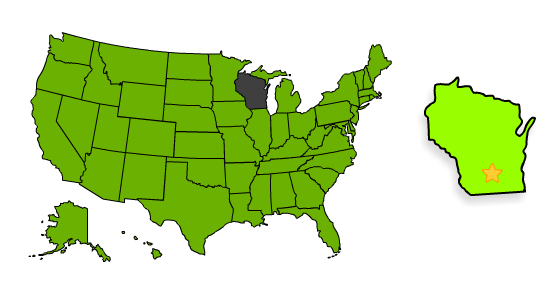
US State Geography Learning Puzzle
Reviews
State the State offers a straightforward way to learn US geography. The multiple-choice and drag-and-drop challenges are engaging without being overwhelming. Hints help when you are stuck, and the free, browser-based access means no setup is required. It is a solid tool for students or anyone wanting to refresh their knowledge of the 50 states.
About This Game
Game Introduction
State the State is an online puzzle game focused on United States geography. The core objective is to identify each of the 50 states based on their shape and location on a map. Designed for students, trivia enthusiasts, and anyone interested in learning US geography, this game provides a clean and intuitive interface. It turns the process of memorizing state names, shapes, and positions into an interactive and enjoyable experience. The game is free to play and accessible directly in a web browser, making it easy to start learning without any downloads or installations.
How to Play
To play State the State, you will see a highlighted shape of a state displayed on the screen. Your task is to select the correct state name from the multiple-choice options provided. Some levels may ask you to drag and drop the state to its correct position on a map. The game includes all 50 states, and each correct answer earns points. If you need assistance, hints are available to help you progress. The goal is to identify every state accurately and complete the entire map.
Game Features
This geography puzzle is educational and family-friendly, with no violence or inappropriate content. It is free to play online and requires no downloads. The clean interface and intuitive gameplay make it suitable for players of all ages. The game includes all 50 US states and offers multiple-choice and drag-and-drop challenges. Hints are available to support learning, and the game rewards correct answers with points.
Tips for Success
To improve your performance, practice regularly by playing through the states multiple times. Focus on learning the shapes and relative positions of states, especially those that look similar. Use the hint feature when you are unsure, and try to associate each state with a memorable fact or region. Taking your time and reviewing mistakes will help reinforce your knowledge. Over time, you will be able to identify states more quickly and accurately.







Comments
0 comments