Roller Coaster Design Studio 2

Roller Coaster Design Studio 2

Solarpeak Labs
2024-11-18
2026-07-04
Skill Strategy Creativity

Reviews

Roller Coaster Design Studio 2 offers a great mix of creativity and problem solving. The drawing tools are easy to use, and the gem collection adds a fun goal. It is perfect for players who enjoy designing and testing their own tracks. The game is family-friendly and encourages experimentation.

About This Game

Game Introduction

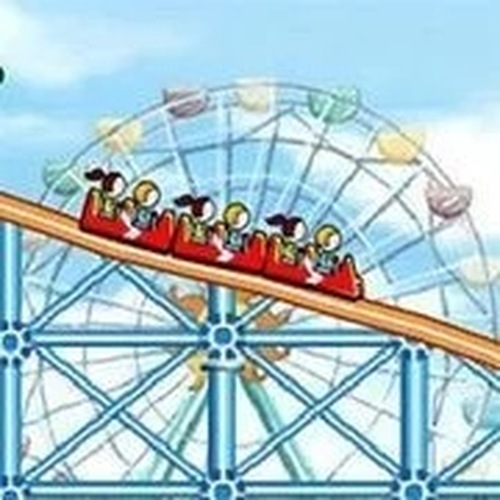
Roller Coaster Design Studio 2 is an online building game where players design and construct their own roller coaster tracks. The main goal is to create a path from a starting point to a finishing point using simple drawing tools. Riders follow the track you build, and your objective is to collect as many gems as possible along the way. This adds a fun challenge to each design. The game is safe for all ages and encourages creative thinking and basic engineering concepts. Each session offers endless possibilities, making every playthrough a fresh experience. Players can experiment with different track shapes and layouts to see how riders react. The game promotes learning through play, helping players understand cause and effect as they adjust their designs. Whether you want a gentle ride or a thrilling coaster, the tools allow you to bring your ideas to life.

How to Play

To play, start by selecting a drawing tool from the game menu. Draw your coaster track on the screen, making sure it connects the start and finish points. Your riders will follow the path you create, so plan carefully to include twists, turns, and loops for maximum enjoyment. Collect gems scattered along the track to earn points and unlock new features. Use the How to Play section for construction tips and tricks to improve your designs. Experiment with different layouts to keep each ride exciting and unique. The game provides clear feedback on your track, so you can see what works and what needs adjustment.

Game Features

Creative track drawing tools let you design any path you imagine. Gem collection challenges add goals and rewards to each ride. The family-friendly design ensures a safe experience for all players. Endless coaster possibilities mean no two games are the same. The game encourages experimentation and learning through play. Players can try different track shapes, including loops and sharp turns, to see how they affect the ride. The intuitive interface makes it easy for beginners to start building right away.

Tips for Success

To succeed, plan your track layout before drawing to ensure a smooth and fun ride. Focus on including loops and sharp turns to increase gem collection opportunities. Practice drawing different shapes to master the tools. Experiment with various track designs to discover what works best. Take your time to refine each track for maximum points. Learning from each attempt will help you create better coasters over time.


Compatibility

• OS: Windows 10+, macOS 11+, iOS 14+, Android 10+
• Browsers: Chrome 100+, Safari 15+, Edge 100+, Firefox 100+
• Not compatible with Internet Explorer
Tested on real devices ✅ works as expected

Faq

Can I save my roller coaster designs in Roller Coaster Design Studio 2?
The game may include a save feature that allows you to store your favorite track designs. Check the game menu for options to save or load your creations. This lets you revisit and improve your coasters later.
Is there a time limit for building tracks in Roller Coaster Design Studio 2?
Most building games of this type do not impose time limits, allowing you to design at your own pace. You can take as long as you need to plan and draw your coaster track without pressure.
What happens if my track does not connect the start and finish points?
If the track is not properly connected, riders may not be able to complete the ride. The game typically provides visual feedback, such as a broken line or error message, to help you fix the connection.
Can I share my roller coaster designs with other players?
Some online building games include sharing features, but this depends on the specific game. Check the game menu or community section to see if you can share your designs with friends or other players.
Are there different difficulty levels in Roller Coaster Design Studio 2?
The game may offer varying levels of challenge based on the complexity of the track you build. More loops and turns can make gem collection harder, but the game does not explicitly state difficulty settings.
What types of drawing tools are available in Roller Coaster Design Studio 2?
The game provides intuitive drawing tools that let you create curves, loops, and straight sections. These tools are designed to be easy to use, allowing players of all ages to build their ideal coaster.

Similar Games

Signal Path Puzzle Game

Puzzle

A clever puzzle game that teaches network logic. Fun for all ages.

PLAY NOW

Elemental Fortress Defense

Defense

A clean, family-friendly tower defense game with clever element matching that rewards strategic thinking.

PLAY NOW

Colony Path Strategy Game

Strategy

Colony Path offers a rewarding turn-based strategy experience with deep resource management and tactical decisions.

PLAY NOW

Jelly Defense Strategy

Action Games

A delightful strategy game with vibrant graphics and engaging tower defense mechanics. Perfect for family fun.

PLAY NOW

Woodling Outpost - Tower Defense Strategy

Cute

A calm, strategic tower defense game with charming visuals and thoughtful resource management for all ages.

PLAY NOW

Math Solitaire 0-21 Card Puzzle

Addition Subtraction

A clean, thoughtful math puzzle that sharpens addition and subtraction skills. Perfect for quick brain breaks.

PLAY NOW

Cursed Treasure Tower Defense

Strategy

A clever tower defense game with a dark twist. Strategic depth and three factions keep it fresh.

PLAY NOW

Fishington.io Online Fishing Challenge

Free For All

Fishington.io offers a fun, social fishing experience with real-time competition and relaxing ocean visuals.

PLAY NOW